
IPTV Encoder Box: What It Does, When You Need One, and How to Choose
An IPTV encoder box takes a live video and audio source, compresses it, and sends it as a stream over an IP network. It is used to create a stream. An IPTV app or set-top box is used to watch one. If you only want to watch an IPTV subscription, you usually do not need an encoder.
The similar names cause expensive mistakes. This guide explains where an encoder fits, which specifications matter, and when a regular streaming device is the right purchase.
What is an IPTV encoder box?
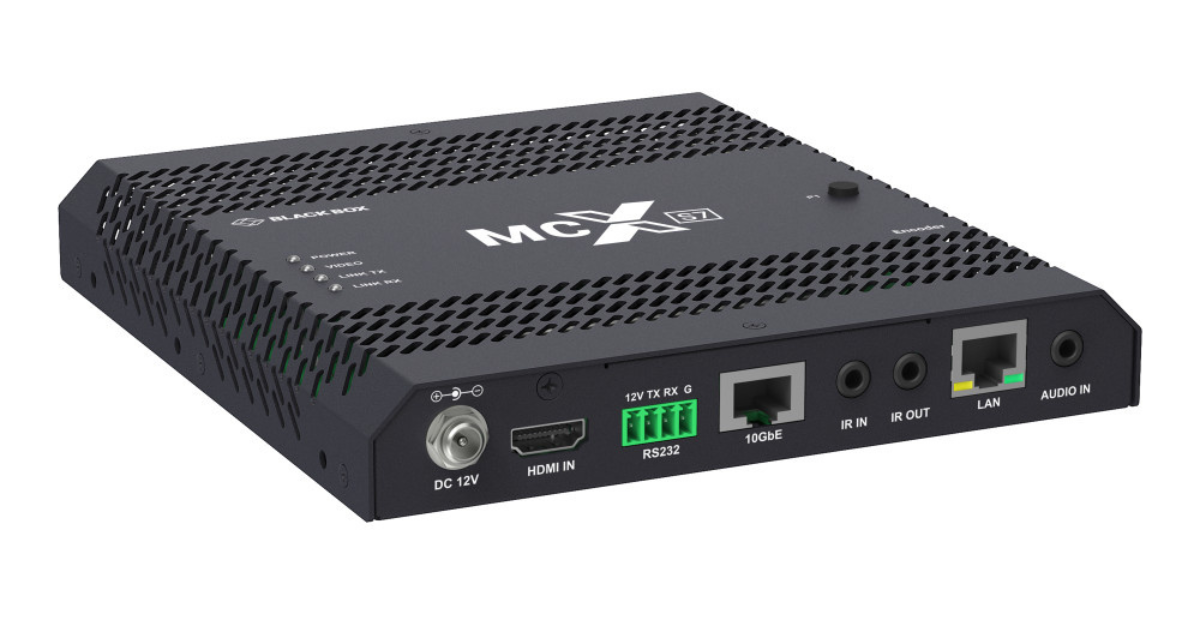
An IPTV encoder box is a dedicated hardware device that accepts a source such as a camera or an authorized HDMI or SDI feed, encodes its video and audio, and outputs a network stream. Hardware models commonly support codecs such as H.264/AVC and H.265/HEVC. The exact inputs, codecs, and streaming protocols vary by model. Haivision describes this role; Epiphan Pearl Nano is one compact example.
The signal path is video source → encoder → IP network → delivery platform → viewer app or set-top box. The encoder handles the first conversion. A separate origin, packager, or CDN may prepare and distribute the stream to viewers. Apple HLS documentation and AWS MediaPackage show these downstream steps.
IPTV encoder box vs. IPTV set-top box
| Question | Encoder box | Set-top box or app |
|---|---|---|
| Main job | Turns a source into an IP stream | Receives and plays a stream |
| Typical input | Camera, HDMI, or SDI feed | Stream over the internet or local network |
| Typical output | Network stream | Picture and sound on a screen |
| Typical user | Broadcaster, venue, school, or content producer | Household or other viewer |
A set-top box is generally a decoder: it receives compressed video and displays it. Haivision describes this playback role. An encoder does not give you channels, a subscription, or permission to distribute copyrighted content.
Do you need an IPTV encoder box?
- Watching an IPTV subscription: Usually no. Choose a supported Smart TV, Fire TV, Android TV, Apple TV, Roku, Chromecast, or another compatible device and player.
- Sending your own live feed: Possibly yes. An encoder may be useful when you need to ingest a camera or other authorized source and deliver it to a receiving platform.
- Running a multi-screen venue: An encoder can be one part of the system, alongside network capacity, stream packaging, access control, and playback devices.
For ordinary viewing, see Stream Velora compatible devices and subscription plans. Those pages concern watching the service; they are not encoder hardware listings.
How an IPTV encoder works
- Capture: Connect an authorized camera or video output to a supported input, commonly HDMI or SDI.
- Compress: Select a codec, resolution, frame rate, audio settings, and bitrate that the destination and viewers can handle.
- Transmit: Send the stream using a protocol supported by the receiving system, such as SRT, RTMP/RTMPS, or HLS, if the specific encoder supports it.
- Deliver and play: The receiving platform may package and distribute the video; a compatible player or set-top box decodes it for display.
Buying an encoder alone does not create a complete IPTV service. Epiphan lists several output protocols for one device, while AWS documents separate packaging and delivery after an upstream encoder.
How to choose the right encoder
- Match the physical input. Check HDMI or SDI, resolution, frame rate, and audio support.
- Confirm destination compatibility. The receiver must accept the output protocol and codec. A feature listed on one model is not universal.
- Size the network connection. Upload bandwidth must exceed total outgoing stream bitrate with room for stability. YouTube recommends 20% headroom for its live workflow; another platform may specify a different margin.
- Plan for viewers. Higher resolution and H.265 require support throughout the workflow, including playback devices.
- Check operations. For important feeds, compare monitoring, remote management, recording, power recovery, and backup connectivity.
- Check rights and protected inputs. Stream only material you may distribute. HDCP-protected HDMI may not be capturable; Epiphan documents this limitation for its capture hardware.
Common buying mistakes
- Buying an encoder to watch TV. A viewer needs a compatible player or playback device.
- Assuming a 4K input guarantees 4K viewing. Output settings, network, platform, source, and viewer device all matter.
- Ignoring the receiver. Check protocol, codec, authentication, and audio compatibility before buying.
- Treating an encoder as a channel provider. It converts an authorized source; it does not supply a content library.
Frequently asked questions
Is an IPTV encoder box the same as an IPTV box?
No. An encoder creates an IP video stream from a source. A typical IPTV box receives and plays a stream on a television. Some professional appliances combine functions, so check specifications.
Do I need an encoder for an IPTV subscription?
Usually not. Most subscribers watch through a compatible app or set-top box. An encoder is relevant when you produce or distribute your own authorized video feed.
Can an encoder stream any HDMI source?
No. The input must match the encoder specifications, you need distribution rights, and protected HDMI signals may not be capturable.
Does an IPTV encoder box provide channels?
No. It converts a video source into a network stream. Channels, subscriptions, rights, and delivery infrastructure are separate.
Which is better, H.264 or H.265?
Neither is automatically best. H.264 is widely supported. H.265/HEVC can be useful when bandwidth efficiency matters, but every step in the workflow must support it.
The practical takeaway
If your goal is to watch IPTV, start with device compatibility and a suitable subscription. If your goal is to create a live IPTV feed, choose an encoder only after confirming the source, destination protocol, codec, bandwidth, and distribution rights.
Ready to watch on a supported device? Compare Stream Velora plans or check compatible devices.