Low Latency IPTV Encoder: What Affects Delay
Quick answer: A low latency IPTV encoder keeps the delay between the source and the screen short. PVI states latency as low as about 50 ms glass-to-glass on a LAN for the VeCASTER, and under 50 ms from HDMI input to IP output in UDP mode for the VeCODER, excluding player buffering. Real delay also depends on the protocol, the network and the receiving player, so test the whole path.
What latency means in an IPTV chain
Total delay is the sum of several steps: capture, encoding, network transport, and buffering in the player. A manufacturer figure usually covers only part of that chain. PVI’s VeCODER number, for example, covers HDMI input to IP output and leaves out player buffering. Treat it as the encoder’s contribution, not the delay your viewers will see.
What PVI states for its encoders
| Encoder family | Stated figure | Conditions |
|---|---|---|
| VeCASTER (single channel) | As low as about 50 ms | Glass-to-glass on a LAN |
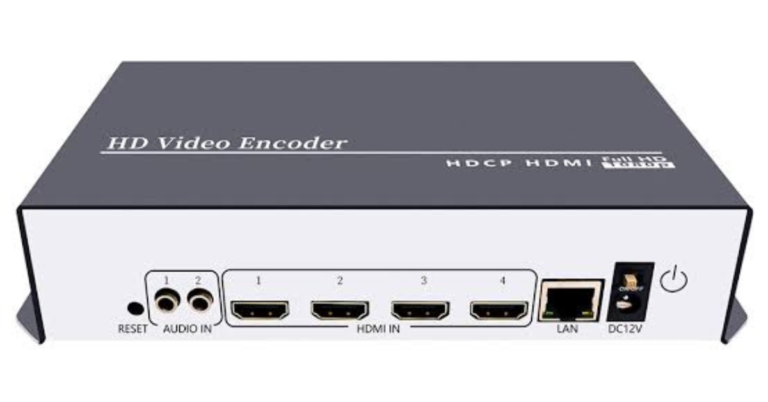
| VeCODER (multi-channel) | Under 50 ms | HDMI input to IP output, UDP mode, excluding player buffering |
These are manufacturer statements, not our own measurements. See the VeCASTER and VeCODER guides for context.
What affects delay beyond the encoder
- Protocol: UDP and multicast on a LAN are typically lower delay than segment-based delivery. HLS adds delay by design because it sends video in segments. See multicast IPTV encoder and M3U8 and HLS encoder.
- Player buffering: many players buffer several seconds by default. A fast encoder cannot fix a slow player.
- Codec and resolution: H.265 and 4K need more processing. See the HEVC encoder and 4K encoder guides.
- Network: congestion, Wi-Fi and long routes add delay and jitter.
Models that list SRT and NDI
If your workflow needs SRT or NDI, PVI lists both on the VeCASTER PRO HDMI ($997) and VeCASTER PRO SDI ($1,495). Both take 1080p and output H.265 or H.264. Other single-channel models start at $495. Compare them in the IPTV video encoder guide.
How to test latency yourself
`n- Show a running clock or timer on the source, such as a phone stopwatch.
- Film the source and the receiving screen together in one frame.
- Compare the two time readings. The difference is your glass-to-glass delay.
- Repeat on each receiver type you plan to use, because players differ.
Need a shortlist? See the best encoder for IPTV picks, or compare costs in IPTV encoder under $1,000. Only distribute content you have the rights to.
Frequently asked questions
What is a low latency IPTV encoder?
It is an encoder that adds as little delay as possible between the source and the stream. Total delay also depends on the protocol, network and player.
How low is the latency on PVI encoders?
PVI states as low as about 50 ms glass-to-glass on a LAN for the VeCASTER, and under 50 ms from HDMI input to IP output in UDP mode for the VeCODER, excluding player buffering.
Why is my IPTV stream several seconds behind?
Player buffering and segment-based delivery such as HLS usually account for most of it. The encoder is typically a small part of the total.
Does SRT reduce latency?
SRT is designed for reliable delivery over imperfect networks. The delay you get depends on its configured buffer and the connection, so test it on your own path.
Is H.264 or H.265 lower latency?
H.265 needs more processing to encode, so low delay setups often favor H.264 where compatibility and bandwidth allow. Test both on your hardware.
Does Stream Velora sell low latency encoders?
No. Stream Velora is an IPTV subscription service, not a PVI hardware seller. Figures come from PVI and may change.